1. Run an Anti-Virus Program – While any anti-virus program will probably do, I like Norton Anti-virus because it hardly slows your computer down at all. Norton AntiVirus Download However, in recent years, microsoft provides a free virus protection solution that also does not affect your performance, although they do not promote it. To use this solution, download Windows Live Essentials. Next, remove any antivirus program you have installed. Finally, in Control Panel, launch Windows Defender and enable this application.
2. Patches and Updates – To be safest, force a download and install new Windows and Office software patches and updates regularly – it is best to set your computer to automatically check for and install new updates.
3. Firewall – Install a firewall in front of your Internet cable to prevent hackers from accessing your network and computers. A $125 Netgear MIMO N router does a nice job, and provides wireless Internet too. Product info
4. Password Protected Screen Saver – Bathroom breaks happen. Protect your unattended computer with a password protected screen saver to prevent unauthorized access.
5. Encrypt Your Wireless Router – Wireless is great, but out of the box it’s vulnerable. Read the bottom of the device for login instructions to access the device’s configuration menu and make these three changes: 1. Change the name of the broadcast device (SSID); Change the default admin password; and 3. Turn on WPA encryption and create a long password (You will need this new WPA password to reconnect computers the first time). These steps are easy and take only 2 minutes. Screen.

6. Encrypt Your Data Files, Folders and Hard Drives – Right click your data files and/or folders and select Properties, Advanced, Encrypt. Thereafter your data files will be protected in case your computer is stolen. Sorry – Home versions of Windows do not offer this feature, and if you have been using the free TrueCrypt product, it was discontinued in May, 2014. TrueCrypt is discontinued
7. Encrypt Your E-Mail – Your e-mails are naked and wide open to the world. To protect your e-mails, install an e-mail encryption program such as PGP, Entrust, Centurion Mail, or GnuPGP. This process takes a little work, because you must exchange locking and unlocking keys with everyone you wish to communicate with in a secure manner. PGP
8. Use Windows (Windows 8.1 would be my first choice) – Windows Vista and higher offers far superior security than previous versions of Windows. In Windows Vista, the kernel (or system core) was changed to prevent unauthorized changes to the computer system without the users knowledge. Windows Vista got a bad rap early because the more secure design required application publishers to update their software to run on the more secure environment. Many publishers were slow to respond and as a result, a lot of applications would not run on Vista when it first arrived. Today however, Windows 8.1, 8, 7 and Vista are far more secure than Windows XP.
9. Regular Back Ups – We all hope and pray that the money and effort we devote to back-ups is a complete waste. However, regular back ups are the last line of defense in protecting your data. Automated online back-ups (XCentric or Carbonite or Mozy) is the best way to go because no labor is involved and off-site storage is achieved automatically. I have alomst 500 GBs of data, dating back 30 years, I back up my entire computer to a 2 TB USB hard drive, and back up my current year data folder online. I also rotate my USB hard drive weekly to monthly with an identical drive offsite.
10. Uninterruptible Power Supply – Plugging your computer gear into an uninterruptible power supply will better protect it from being damaged by electrical spikes and brown outs. This measure can also save time and prevent headaches associated with unexpected power failures which shut your computer off without notice. American Power Products
11. Internet Filtering – Inappropriate material from the Internet could distract your employees and in the worst case scenario lead to law suits. You should take measures to stop inappropriate material from entering your computer systems by filtering Internet content. At a minimum, you should require employees to apply strict filtering to all Internet searches and better yet, subscribe to a service that will filter your Internet content at the router or provider level. Barracuda Filter
12. Strong Passwords – Most people don’t realize that strong encryption tools are only as good as the strength of the password. If does little good to use hard core 128-bit encryption with only a 2-bit password. All passwords should be lengthy and should contain random numbers and letters to prevent easy guessing. Microsoft's Password Checker
13. Employee & Customer Background Checks – Fakes IDs are available on the streets of America for $150 for a Tri-fecta package containing driver’s license, social security card and green card. This makes identity fraud very easy. To protect yourself, you should run background checks and require references on all potential employees and customers – before you hand over the keys to the office or extend credit. Examples.
14. Good Computer Disposal Techniques – Old computer hard drives, cell phones and hand held devices can contain critical data – even if it has been erased. There are a number of strategies you could employ – data erasure tools, computer shredding, computer disposal companies, etc. I recommend that you protect yourself by removing all hard drives before getting rid of those computers and devices. Lock them in a safe of destroy them with a hammer. Examples
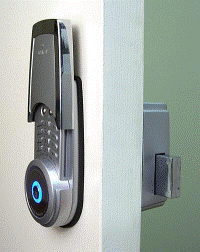
15. Upgrade Door Locks – For good measure, one more security step that can help is to upgrade your door locks to “pick proof” door locks. Studies show that most computer information is lost only after a thief has penetrated a locked door or locked car. Most key locks can be picked easily – but newer encrypted code door locks like the one shown below cost on $99 and do a far better job. Be sure to bolt your windows shut too.
16. Shred Everything – Discarded paper documents are vulnerable – make sure that information such as social security numbers and account numbers don’t leak out by shredding everything. A shredding service will come to your office and you should witness the destruction of all older files and documents. Examples.
17. Run Online Security Tests – Make sure that your computers are safeguarded by running online security tests. These tests will probe your systems and alert you to vulnerabilities that need addressing. For example, Shields Up at grc.com provides a variety of such tests which could easily inform you of potential dangers. Sheilds Up.
18. Employee Agreements – Ask all employees to sign a contract agreeing to adhere to appropriate security procedures and avoid inappropriate web site materials. The contract should spell out specific forbidden activities. Sample Contracts.
19. Periodic Computer Checks – A security official in your company should monitor computer use, e-mails and internet usage on an ongoing basis, and employees should be made aware of this check. Random computers should be checked periodically to detect the use of pirated software, to detect the usage of non business activities, to check web site activity, and to check for non business related e-mail activity. Such checks will deter most employees from using computer equipment inappropriately and wasting time on non business activities.
20. Physical Inventories And Surprise Cash Counts – Companies should conduct regular and surprise physical inventories and surprise cash counts to identify and deter theft.
21. Be Wary of Hacking Tools – There are many clever hacking tools out there such as keystroke loggers that can be used to steal your passwords and data, but in order to use them, criminals and hackers must have physical access to your computers, cell phones or devices. You can protect yourself by preventing unauthorized access to your equipment using locked doors and common sense. Hacker Clubs.
22. Bolt Down Computer Systems – There are many cables and locking mechanism that enable you to bolt down your computer equipment to the desk – dramatically reducing crimes of opportunity. Even laptop computers can be secured in seconds with a standard with security cable – whether in a car, your office, or the client’s office. Examples.
23. Filter Out Spam – At a minimum, Spam steals your time and clever spam might trick you into revealing confidential information that could be used to steal from you. There are several approaches to eliminating Spam, from turning on spam blocking in your Outlook program, installing a third party spam prevention application, or enabling spam filtering at the router or e-mail provider level.
24. Follow The following 39 Identity Theft Procedures – You can't guarantee that you will never be a victim, but you can minimize your risk with the following measures.
1. Big Duh - Don't give out personal information on the phone, through the mail or over the Internet (through email or online forms, or any other manner) unless you have initiated the contact or are sure you know who you're dealing with.
2. Resist Providing Personal Information - Before revealing any personally identifying information (for example, on an application), find out how it will be used and secured, and whether it will be shared with others. Ask if you have a choice about the use of your information. Can you choose to have it kept confidential?
3. Secure Your Home - Secure personal information in your home in safes that are bolted to the floor, especially if you have roommates, employ outside help, or are having service work done in your home. Securely store extra checks, credit cards, documents that list your Social Security number, and similar valuable items.
4. Fool Burglars - Don't advertise to burglars that you're away from home. Put lights on timers, temporarily stop delivery of your newspaper, and ask a neighbor to pick up any items that may arrive unexpectedly at your home.
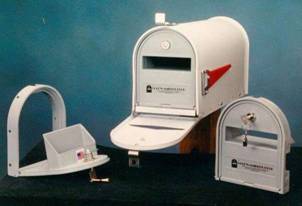
5. Guard Your Mail – Pick up mail from your mailbox promptly. Do not send mail through your mailbox – a red flag raised on your mailbox is …well…a red flag for burglars that a check is probably waiting inside. If you're planning to be away from home and can't pick up your mail (or are called away on an unexpected business trip or family emergency), call the U.S. Postal Service at 1-800-275-8777 to request a "vacation hold" or ask your carrier or a counter clerk for a "Authorization to Hold Mail" form (PS Form 8076). You might also consider purchasing and installing a relatively secure "locking" mailbox for either city or rural use.
6. Guard Your Trash - Protect your garbage. Identity thieves rummage through trash in your trash can or at landfills looking for personal information. To thwart identity thieves, who may pick through your trash or recycling bins to capture your personal information, tear or shred your...
a. charge receipts,
b. copies of credit applications,
c. insurance forms,
d. physician statements,
e. checks and bank statements,
f. credit card statements,
g. expired charge cards that you're discarding,
h. pre-approved credit card offers you get in the mail, and
i. any documents that contain your social security number
7.
Opt-Out - If you do not use the
pre-screened credit card offers you receive in the mail, you can "opt out"
by calling 1-888-5-OPTOUT (1-888-567- 8688). You will be asked for
your Social Security number in order for the credit bureaus to identify your
file so that they can remove you from their lists and you still may receive
some credit offers because some companies use different lists from the
credit bureaus' lists.
(If you do accept a credit card offer, be aware that some credit card
companies, when sending out credit cards, have recently adopted security
measures that allow a card recipient to activate the card only from his/her
home phone number, but this is not yet a universal practice.)
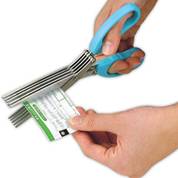
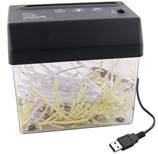
8. Purchase a Shredder – Shredders come in a variety of styles and prices, starting with shredding scissors and exculpating to powerful shredders that can shred through binder clips.
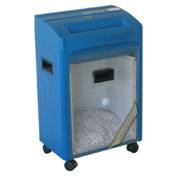
9.
Limit, protect, and be aware of the type and
amount of personal data you carry around...
Keep your purse/wallet and organizer/briefcase - as well as any copies you
may retain of administrative forms that contain your sensitive personal
information - in a safe place at work.
10. Use PINS & Passwords - Place passwords on your credit card, bank, brokerage and phone accounts. Avoid using easily available information like your mother's maiden name, your birth date, the last four digits of your SSN or your phone number, or a series of consecutive numbers. When opening new accounts, you may find that many businesses still have a line on their applications for your mother's maiden name. Use a password instead.
11. At Work - Keep your purse or wallet in a safe place at work.
12. Monitor Bills - Pay attention to your billing cycles. Follow up with creditors if your bills don't arrive on time. A missing bill could mean an identity thief has taken over your account and changed your billing address to cover his tracks. Check your bills/statements carefully and call companies if you do not receive regular bills in a timely manner. Make it your habit to review your bank and credit card statements as soon as you receive them and report any unauthorized transactions promptly so the accounts can be closed.
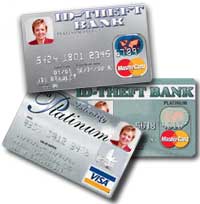
13. Credit Card Photos - Some issuers of bank and/or credit cards offer the option of adding the PHOTO of the named customer on the face of the card. If your issuer(s) offer this option, TAKE ADVANTAGE. It's certainly more difficult for someone else to use a card with your photo on it.
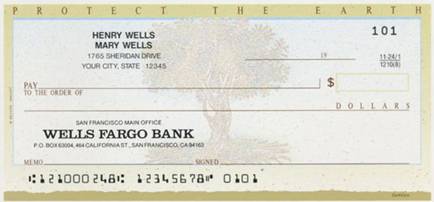
14. Be Check Smart - When ordering new checks, pick them up at the bank, rather than having them sent to your home mailbox. Consider using only your first initial(s) rather than your full name so a thief won't know what to sign. To save time, many people have their bank print every bit of personal info they can fit on personal checks to speed up check approval in the check-out line (and minimize what they have to write-in by hand). Resist the urge. Don't put any information other than your name and address on your checks. Also, keep a close watch on your checkbook both when you're writing checks and when it is lying around.
Some thieves use cleaning solvent to remove what is already written on a check, making it payable to themselves. To make this harder, you should write checks using a pen with thick, dark ink. Draw lines to fill in gaps in the spaces where you designate to whom a check is payable and the amount.
If your checks have been stolen or misused, immediately notify your bank, place a stop payment order, and close your checking account. Also, immediately report to your bank any irregularities in your bank statements. Report mail theft or tampering to the U.S. Postal Inspection Service, which is listed in your phone book
15. GUARD deposit slips as closely as you do checks. Not only do they have your name, address and account number printed on them, but they can also be used to withdraw money from your account. All a thief has to do is write a bad check, deposit it into your account and use the "less cash received" line to withdraw your money.
16. Avoid Shoulder Surfers - A "shoulder-surfing" identity thief can memorize your name, address and phone number during the short time it takes you to write a check. Also, in many public places "shoulder surfing" criminals can stand nearby and watch you punch in your phone-card number, debit-card PIN, credit card number, or even listen in on your conversation if you give your credit-card number over the phone for a hotel room or rental-car. Don't carry more checks that you need. Keep extra checks in a secure place.
17. Bolster Your Insurance - ID theft already is covered under some homeowners' policies; others will add it for as little as $25 a year. A stand-alone policy costs from $60 to $200.
18. Be Careful in Job Searches - Online recruiting business giants like Monster.com, CareerBuilder.com and HotJobs.com caution users about false online job listings that are sometimes posted by identity thieves to illegally collect personal information from unsuspecting job seekers.
19. Check Your Credit Reports - Order a copy of your credit report from each of the three major credit reporting agencies every year. Make sure it is accurate and includes only those activities you've authorized.
20. Be Careful at Restaurants - When paying at stores, restaurants, and other businesses, be methodical at the payment counter, ensuring you retrieve your driver's license or other ID, credit card and your credit slip copy after your purchase. Make sure that the person you give the credit card to really is the waiter or proper person.
21. Xerox Your Wallet or Purse – Take a few minutes to make paper copies of all of the cards and IDs you carry in your wallet or purse, including the backs as they contain contact phone numbers in the event of theft. Secure the copies in a safe pace.
22. ATM Crime - "Shoulder surfers" aren't limited to checkout stands and lines. Near ATMs, some sophisticated thieves will watch the victim use the card (perhaps using high-powered binoculars, or even hidden cameras) and learn the victim's personal identification number (PIN) and even the card number. Later, they'll steal the card or make their own and use ATMs to withdraw cash from your account. Watch for one or more persons loitering around an ATM, often in a car, behind bushes or otherwise nearby. Use your body, or cup your other hand over the keypad, to "shield" it as you enter your PIN into the ATM. Never write your PIN on the back of your card; you could lose it, and some ATM scams involve a scammer "distracting" the victim and grabbing the card before running away.
23. Drive up ATMs - If you are using a drive-up ATM, keep your engine running and be sure your passenger windows are rolled up and all doors are locked. Before you roll down your window to use the ATM, observe the entire surrounding area; if anyone or anything appears to be suspicious, drive away at once. When possible, leave enough room between cars when you're in the ATM drive-up queue to allow for a quick exit, should it become necessary.
24. Counterfeit Cashier's Check
1. Inspect the cashier's check.
2. Ensure the amount of the check matches in figures and words.
3. Check to see that the account number is not shiny in appearance.
4. Be watchful that the drawer's signature is not traced.
5. Official checks are generally perforated on at least one side.
6. Inspect the check for additions, deletions, or other alterations.
7. Contact the financial institution on which the check was drawn to ensure legitimacy.
8. Obtain the bank's telephone number from a reliable source, not from the check itself.
9. Be cautious when dealing with individuals outside of your own country.
25. Credit Card Fraud
a. Ensure a site is secure and reputable before providing your credit card number online.
b. Don't trust a site just because it claims to be secure.
c. If purchasing merchandise, ensure it is from a reputable source.
d. Promptly reconcile credit card statements to avoid unauthorized charges.
e. Do your research to ensure legitimacy of the individual or company.
f. Beware of providing credit card information when requested through unsolicited emails.
26. Debt Elimination
a. Know who you are doing business with - do your research.
b. Obtain the name, address, and telephone number of the individual or company.
c. Research the individual or company to ensure they are authentic.
d. Contact the Better Business Bureau to determine the legitimacy of the company.
e. Be cautious when dealing with individuals outside of your own country.
f. Ensure you understand all terms and conditions of any agreement.
g. Be wary of businesses that operate from P.O. boxes or maildrops.
h. Ask for names of other customers of the individual or company and contact them.
i. If it sounds too good to be true, it probably is.
27. DHL/UPS
a. Beware of individuals using the DHL or UPS logo in any email communication.
b. Be suspicious when payment is requested by money transfer before the goods will be delivered.
c. Remember that DHL and UPS do not generally get involved in directly collecting payment from customers.
d. Fees associated with DHL or UPS transactions are only for shipping costs and never for other costs associated with online transactions.
e. Contact DHL or UPS to confirm the authenticity of email communications received.
28. Employment/Business Opportunities
a. Be wary of inflated claims of product effectiveness.
b. Be cautious of exaggerated claims of possible earnings or profits.
c. Beware when money is required up front for instructions or products.
d. Be leery when the job posting claims "no experience necessary".
e. Do not give your social security number when first interacting with your prospective employer.
f. Be cautious when dealing with individuals outside of your own country.
g. Be wary when replying to unsolicited emails for work-at-home employment.
h. Research the company to ensure they are authentic.
i. Contact the Better Business Bureau to determine the legitimacy of the company.
29. Escrow Services Fraud
a. Always type in the website address yourself rather than clicking on a link provided.
b. A legitimate website will be unique and will not duplicate the work of other companies.
c. Be cautious when a site requests payment to an "agent", instead of a corporate entity.
d. Be leery of escrow sites that only accept wire transfers or e-currency.
e. Be watchful of spelling errors, grammar problems, or inconsistent information.
f. Beware of sites that have escrow fees that are unreasonably low.
30. Identity Theft
a. Ensure websites are secure prior to submitting your credit card number.
b. Do your homework to ensure the business or website is legitimate.
c. Attempt to obtain a physical address, rather than a P.O. box or maildrop.
d. Never throw away credit card or bank statements in usable form.
e. Be aware of missed bills which could indicate your account has been taken over.
f. Be cautious of scams requiring you to provide your personal information.
g. Never give your credit card number over the phone unless you make the call.
h. Monitor your credit statements monthly for any fraudulent activity.
i. Report unauthorized transactions to your bank or credit card company as soon as possible.
j. Review a copy of your credit report at least once a year.
31. Internet Extortion
a. Security needs to be multi-layered so that numerous obstacles will be in the way of the intruder.
b. Ensure security is installed at every possible entry point.
c. Identify all machines connected to the Internet and assess the defense that's engaged.
d. Identify whether your servers are utilizing any ports that have been known to represent insecurities.
e. Ensure you are utilizing the most up-to-date patches for your software.
32. Investment Fraud
a. If the "opportunity" appears too good to be true, it probably is.
b. Beware of promises to make fast profits.
c. Do not invest in anything unless you understand the deal.
d. Don't assume a company is legitimate based on "appearance" of the website.
e. Be leery when responding to invesment offers received through unsolicited email.
f. Be wary of investments that offer high returns at little or no risk.
g. Independently verify the terms of any investment that you intend to make.
h. Research the parties involved and the nature of the investment.
i. Be cautious when dealing with individuals outside of your own country.
j. Contact the Better Business Bureau to determine the legitimacy of the company.
33. Lotteries
a. If the lottery winnings appear too good to be true, they probably are.
b. Be cautious when dealing with individuals outside of your own country.
c. Be leery if you do not remember entering a lottery or contest.
d. Be cautious if you receive a telephone call stating you are the winner in a lottery.
e. Beware of lotteries that charge a fee prior to delivery of your prize.
f. Be wary of demands to send additional money to be eligible for future winnings.
g. It is a violation of federal law to play a foreign lottery via mail or phone.
34. Nigerian Letter or "419"
a. If the "opportunity" appears too good to be true, it probably is.
b. Do not reply to emails asking for personal banking information.
c. Be wary of individuals representing themselves as foreign government officials.
d. Be cautious when dealing with individuals outside of your own country.
e. Beware when asked to assist in placing large sums of money in overseas bank accounts.
f. Do not believe the promise of large sums of money for your cooperation.
g. Guard your account information carefully.
h. Be cautious when additional fees are requested to further the transaction.
35. Phishing/Spoofing
a. Be suspicious of any unsolicited email requesting personal information.
b. Avoid filling out forms in email messages that ask for personal information.
c. Always compare the link in the email to the link that you are actually directed to.
d. Log on to the official website, instead of "linking" to it from an unsolicited email.
e. Contact the actual business that supposedly sent the email to verify if the email is genuine.
36. Ponzi/Pyramid
a. If the "opportunity" appears too good to be true, it probably is.
b. Beware of promises to make fast profits.
c. Exercise diligence in selecting investments.
d. Be vigilant in researching with whom you choose to invest.
e. Make sure you fully understand the investment prior to investing.
f. Be wary when you are required to bring in subsequent investors.
g. Independently verify the legitimacy of any investment.
h. Beware of references given by the promoter.
37. Reshipping
a. Be cautious if you are asked to ship packages to an "overseas home office."
b. Be cautious when dealing with individuals outside of your own country.
c. Be leery if the individual states that his country will not allow direct business shipments from the United States.
d. Be wary if the "ship to" address is yours but the name on the package is not.
e. Never provide your personal information to strangers in a chat room.
f. Don't accept packages that you didn't order.
g. If you receive packages that you didn't order, either refuse them upon delivery or contact the company where the package is from.
38. Spam
a. Don't open spam. Delete it unread.
b. Never respond to spam as this will confirm to the sender that it is a "live" email address.
c. Have a primary and secondary email address - one for people you know and one for all other purposes.
d. Avoid giving out your email address unless you know how it will be used.
e. Never purchase anything advertised through an unsolicited email.
39. Third Party Receiver of Funds
1. Do not agree to accept and wire payments for auctions that you did not post.
2. Be leery if the individual states that his country makes receiving these type of funds difficult.
3. Be cautious when the job posting claims "no experience necessary".
Be cautious when dealing with individuals outside of your own country.
Identity Theft - What To Do If It Happens To You
1. Report it to the police
2. Cancel all credit cards
3. Call fraud units - Experian, Equifax, Trans Union
4. Notify banks
5. Fill out fraud affidavits to prove innocence
6. Get a new ATM card
7. Have SSN changed
8. Notify the passport authorities
9. Report stolen checks to TeleCheck, National Processing Company (NPC), and Equifax
10. Notify postal inspector if you suspect mail theft
11. Call telephone, electricity, and gas companies and alert them
12. Change drivers license number
13. Call Consumer Credit Counseling for help removing fraudulent claims from your record 800.388.2227
14. Keep a log of all conversations you have dealing with this, including names and dates
15. Consider seeking legal counsel.
16. Pay attention to your mental health
17. Change passwords everywhere
18. Change PIN numbers
19. Change e-mail addresses
20. Use common sense
25. Steps for Preventing Employee Theft - Statistics indicate that only two percent of businesses that suffer losses from employee theft take subsequent steps to prevent future cases of employee theft. To deal with the problem of employee theft, employers can:
1. Better Hiring - In general, establish a smart hiring process more likely to yield trustworthy employees (i.e. personal interviews, background checks, credit checks, etc.);
2. Better Accounting - In general, improve accounting practices and record keeping, establish an internal employee theft department, beef up security measures, and more.
3. Pre-Screen Employees - For as little as $10 you can check criminal records, credit history or other information. Background checks should include:
a. Criminal history for crimes involving violence, theft, and fraud;
b. Civil history for lawsuits involving collections, restraining orders, and fraud;
c. Driver's license check for numerous or serious violations;
d. Education verification for degrees from accredited institutions;
e. Employment verification of positions, length of employment, and reasons for leaving.
4. References - Check and document references of each new hire.
5. Conduct Frequent Physical Inventories - Pilferage is one of the most common forms of internal loss. Reconcile sales to inventory on a quarterly basis, or at least annually, with the help of a third party. Conduct surprise inventories.
6. Separate Bookkeeping Functions - Misapplication of payments can lead to embezzlement. Do not let the same person who processes checks also manage the accounts receivable records.
7. Personally Approve Bookkeeping Adjustments - Approve any adjustments to the books no matter how slight – even adjustments to correct an error.
8. Control Check Signers - Limit the number of signatories to yourself and one or two highly trusted assistants. Keep blank checks under lock and key.
9. Review Monthly Bank Statements - Instruct your bank to send the monthly statement directly to you. Review the statement before passing it on to your bookkeeper. This review allows you to spot any improperly executed checks.
10. Tighten Up On Petty Cash - Allow only one or two trusted employees to disburse petty cash. Require that a receipt and a signed voucher be submitted for all petty cash disbursements.
11. Separate Buying and Bookkeeping - To maintain a system of checks and balances, assign ordering and payment responsibilities to different employees.
12. Watch Company Credit Cards - Require all credit cards be signed out and all credit card expenses be authorized by a purchase order.
13. Document All Expense Reports - Require strict documentation for all reimbursable expenses incurred by employees. Subject every expense account voucher to a pre-audit review procedure before payment.
14. Have A Third Party Refund Policy - Issue refunds only upon the approval of a third party, preferably a trusted assistant.
15. Culture of Honesty – Try to cultivate a culture of honesty within your organization. Short seminars, circulating articles, and recognizing and rewarding correct behavior. A positive work environment encourages employees to follow established policies and procedures, and act in the best interests of the organization. Fair employment practices, written job descriptions, clear organizational structure, comprehensive policies and procedures, open lines of communication between management and employees, and positive employee recognition will all help reduce the likelihood of internal fraud and theft.
16. Security Cameras – Install cameras throughout your facilities to record and capture all activities.
17. Be Organized – A well organized stock room, supply room or warehouse makes it easier to spot missing items.
18. Test The System – Remove some inventory, introduce a bogus invoice, etc - see how long it takes for your employees to discover the errors.
19. Closing Procedures - Prepare a check-list of closing and lock-up procedures for employees. Make sure appropriate employees understand what is expected.
20. Security Tags - Make sure all equipment is marked. Take time to mark company equipment with inventory tags or an electric pencil. Computers and computer-related equipment is vulnerable, particularly laptop computers. Use equipment serial numbers or a similar system to track equipment.
21. Employee IDs - Use an employee identification system, if practical. If you have many full- and part-time employees or you are having key management problems, an access system that requires the employee to insert an electronically coded card upon entering the business or specific areas will give additional control.
22. Screen New Customers – A common ploy occurs when employees sell goods to their friends, who in turn disappear and never pay. Take time to perform reasonable background checks on new customers to ensure their authenticity. Look up their address on Google maps, call the phone number to make sure it is valid, ask for letterhead and business cards, review the customer’s web site, call and welcome the customer, visit the customer.
23. Escalate Larger Accounting Transactions – Implement measures to hold the processing of larger transactions until approved by a third party within your organization. The escalation threshold can be increased as employees earn more trust.
24. Implement An Anonymous Reporting System - Provide a confidential reporting system for employees, vendors, and customers to anonymously report any violations of policies and procedures.
25. Perform Regular and Irregular Audits – Perform regular and random unannounced financial audits and fraud assessments to help identify new vulnerabilities, and to measure the effectiveness of existing controls. This lets employees know that fraud prevention is a high priority for the organization.
26. Investigate Every Incident - A thorough and prompt investigation of policy and procedure violations, allegations of fraud, or warning signs of fraud will give you the facts you need to make informed decisions and reduce losses.
27. Eliminate Temptations – Eliminate as many temptations as you can by securing goods and cash, locking doors and drawers, and implementing well known controls.
28. Keys - Be careful with keys. Sign out all keys and collect them when employees leave the company. Better yet, move to electronic card keys that can be disabled when employees leave.
29. Lead By Example - Senior management and business owners set the example for the organization's employees. A cavalier attitude toward rules and regulations by management will soon be reflected in the attitude of employees. Every employee — regardless of position — should be held accountable for their actions.
30. Use Consecutive Numbers - Make sure all checks, purchase orders, and invoices are numbered consecutively, and regularly check for missing documents.
31. For Deposit Only Stamp - Use a "for deposit only" stamp on all incoming checks to prevent an employee from cashing them.
32. Unopened Mail - Unopened bank statements and canceled checks should be received by the business owner or outside accountant each month and they should carefully examine for any red-flag items such as missing check numbers. They should also look at the checks that have been issued to see if the payees are legitimate, and make sure that the signatures are not forgeries.
33. Reconcile Statements – The purpose of the bank statement reconciliation is to prove that the cash on the books agrees with the cash at the bank. It is difficult for an employee to hide theft when bank reconciliations are prepared monthly. Of course, bank reconciliations should be prepared by an outside person and need to be reviewed by management.
34. Two Signatures - Require all large checks to have two signatures. Never sign a blank check. Sign every payroll check personally. Avoid using a signature stamp.
35. Insurance – Consider obtaining an insurance policy that covers outside crime, employee theft and computer fraud. It will be there as a safety net in case your fraud prevention tactics don't work.
36. Look for Stress - Be alert to disgruntled or stressed employees, or those who have indicated that they are having financial difficulties. Also look for any unexplained significant rises in an employee's living standards.